News

Workshop Beta Branch Patch 1.5.8 Notes

Workshop Beta patch 1.5.8 is a small update, but we wanted to get something out fairly quickly to address some of the initial issues people found with the addition of the Stage Editor. If you need help accessing this beta please visit our original article announcing its public launch, or take a look at our in-depth technical manual for building content.

New Features

  • Workshop characters without an ai_init file will now use a default AI we’ve created to give them a little fight. You’ll still need to work on your own AI scripts if you want CPU versions of your characters to use all of their unique abilities and playstyles when people download them.

Major Fixes

  • Players can now properly view multiple pages of custom stages.
  • The custom character button now properly appears in casual and practice modes.
  • Stages now properly use the tag set in their config.ini when uploaded.
  • Buddies now work properly on custom stages.

Workshop Beta Branch Patch 1.5.7 Notes

Patch 1.5.7 is our latest update for the Workshop Beta branch, and it includes the next big feature from our road map – the Stage Editor. If you need help accessing the beta version please visit our original article announcing its public launch, or take a look at our in-depth technical manual for building content. Now on to the notes!

New Features

  • The Stage Editor is now accessible from the Workshop menu. Create custom stages directly in the game using standard controls or your mouse.
  • There are two types of stages you can make:
    • Standard stages: Built entirely with ingame assets, these are a good starting point for beginners and for prototyping new stage layouts quickly. There are 8 tilesets / stage backdrops available in this first beta release, with more to be added in future updates.
    • Advanced stages: Enables you to create your own background graphics, audio, and more. Additionally, custom scripting support will be coming in a future update. Any Standard stage can be converted into an Advanced stage in the Stage Editor menu.
  • Config files now have a ‘Finished’ flag. Set this to true and tag your item as finished so players can filter out work-in-progress items.
  • Both friendly and casual matches have a new change rules menu that allows you to enable workshop characters. NOTE: Make sure to enable this option to play with workshop characters and stages.

Major Fixes

  • Fixed a crash on casual 1v1 startup with custom characters selected.
  • Fixed a crash caused by different character loading times on different machines.
  • Fixed custom items’ version mismatch popup triggering at wrong times.

We’re grateful for the amount of support and activity that the Workshop Beta has received so far. If you’re ready to dive in and make your own stages, make sure you check out our latest manual entry on the new stage editor. We can’t wait to see what you make with this latest update!

Patch 1.4.15 Notes

  • Halloween colors are back! This year Rivals are wearing their costumes before the match starts.
  • You can no longer fastfall after being parried.
  • With strong attack option on: letting go of the direction before pressing attack will no longer activate a strong attack.
  • Hitting Eid (the guy in Tower of Heaven’s window) will no longer cause hitpause for the attacker.

  • Dash Attack hitstun multiplier decreased from x1.0 > x0.85.
  • Dash Attack angle flipper changed from 6 > 0.
  • Grounded dash attack is now jump-cancellable on hit after 8 frames of endlag.
  • Dair angle adjusted from 50 > 361 (45 in air, 40 on ground).
  • Slipstream height reduced from 44px > 40px.

  • Opponents will no longer move when in hitpause on top of a falling pillar.
  • Holding left or right when starting pillarless Uspecial will give the same boost as when cancelling Fspecial.

  • Charged Fspecial now has invincibility when spawning the super clone that lasts 4 frames after the clone is created (19 frames of invincibility total).

  • Uspecial hit 1 now moves opponents while in hitpause, but only if their hurtbox will not be hit by the 2nd hitbox (shouldn’t affect normal usage of the move, but should make it still connect when hitting extended hurtboxes).

  • Fspecial explosion base damage: 2 > 3.
  • Holding down during the first 5 frames of Dair’s descent makes Ori fall through platforms.

Steam Workshop Open Beta is Now Available

This Article is Out of Date
This article was originally posted for the release of the Workshop Beta in 2019. If you are a new Rivals player looking to use the workshop, do not follow the beta steps mentioned in this article. Instead:

1. Download items you like from the Steam Workshop.
2. On the character select screen, change rules to “ON” for Workshop at the top.
3. Select the gear above Shovel Knight to choose from your list of downloaded workshop characters.

Just one month ago we announced that Steam Workshop support was coming to Rivals of Aether. This feature opens up a whole new world in Rivals for people to create, discover, and play with community-created characters, stages, skins, and buddies.
As we launch the Workshop Open Beta today, we’re including two full example Workshop characters for you to play and tinker with to help create your own Rivals. This Beta build also combines our previous open beta (New Netcode) with the Steam Workshop to allow both features to be accessed on one testing client.

How do I get it?
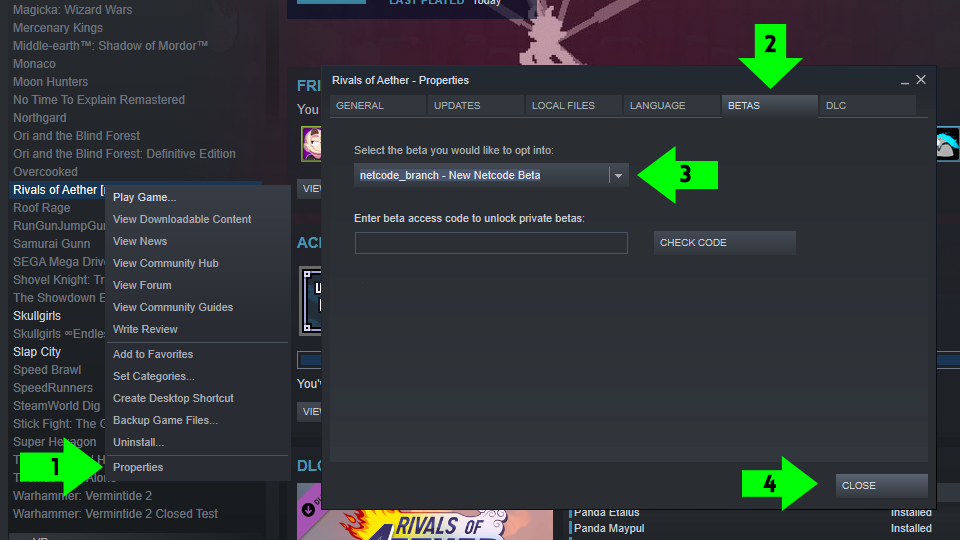
The Workshop Build can be accessed through Steam exclusively. Find Rivals of Aether in your Steam Library and then Right Click it to bring up the option menu. From there:

  • (1). Select Properties. Once that opens, navigate to the Betas Tab.
  • (2). Open the Dropdown menu and select Workshop Beta.
  • (3). Finally, once it is selected you can close the menu.
  • (4). After you select this branch, you should see that Rivals has an update queued. If you do not see that, then close Steam and reopen it until Rivals of Aether has an update. When you open the game, you will know you are on the right branch if you see the Steam Workshop Open Beta Loading Screen.

Getting Started with Steam Workshop

In the time leading up to this release we’ve already seen a flurry of amazing character art and designs floating around from eager creators. If you’re someone who can’t wait to make your own character or you just want to play some fan-created Rivals, here’s everything you’ll need to know:

1. First, make yourself familiar with the Steam Workshop tab that is now visible on the Rivals of Aether app page on Steam. Here is where you can view, vote on, and download people’s creations. It’s important to note that if you want to use these characters online, both players will need to subscribe to the character here.

Note: Online play is temporarily disabled while we work out a few last minute bugs. We’ll update it as soon as we can get it fixed which will likely take a couple days. You can still begin creating your characters and play locally for now.
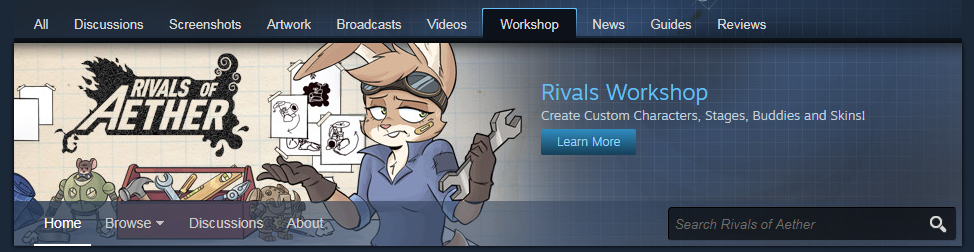
2. Once you’ve subscribed to a workshop character, you’ll be able to play them by selecting that character with the new menu button next to “random”. If you just want to play workshop characters this is the last step you’ll need to do (besides going back to the workshop page on Steam and voting for your favorites).
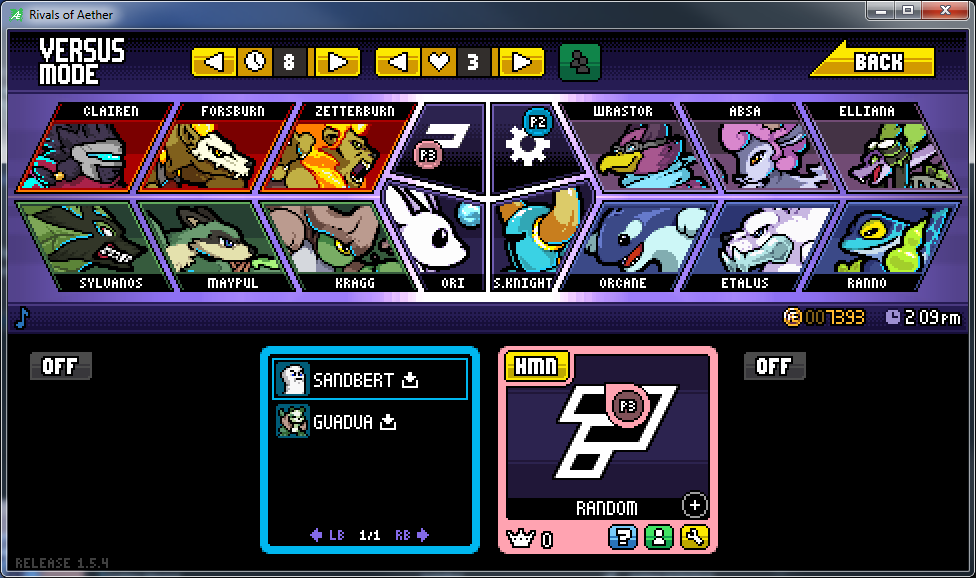
3. If you’d like to create your own workshop characters, a great place to start is by using the two example characters we created. Sandbert is a good example of a simple character while Guadua is more in-depth with some exotic moves to get your creative juices flowing.

Workshop characters that you are working on need their files placed within your AppData folder. Files stored locally in this working directory can even be updated during a match by pressing “F5” to apply your latest changes.

To find workshop content that you’ve downloaded from Steam and move a copy into your working directory, search within
C:\Program Files (x86)\Steam\steamapps\workshop\content\383980
and copy it here:
C:\Users\{Your Account}\AppData\Local\RivalsofAether\workshop

If your steam library is installed in an area that’s not the default, you can also do a search for the Rivals app ID (383980) to find Steam’s Workshop download folder. If done correctly you should now see the additional content in your game.
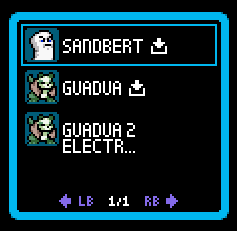
Success!

Steam Workshop Modding Manual

In addition to the example characters we’ve also put together a Modding Manual. In it you can find all of the technical details and references you’ll need when creating your own character.
Keep in mind that our Steam Workshop Feature and Modding Manual are currently in beta. If you find an error in the manual or area we can improve, please let us know through either our social links at the top of this page or by email at [email protected]. Letting us know when something goes wrong helps us make sure that when the workshop fully launches it’s an excellent experience for both players and creators.

We hope you enjoy Steam Workshop in Rivals and can’t wait to see what people create!

Patch 1.4.14 Notes

As a summer of action packed majors and grassroots events comes to a close, we’re taking this opportunity to make some cool changes across the cast. Read on for the full notes below.

  • Notes with this label 1.4.14 hotfix were added in a hotfix on 8/26.
    • Holding special will no longer count as holding jump during a wall cling.
    • The purple kill effect now ignores Kragg’s pillar and rock (necessary for optimization).

    • Dspecial cancel can now drift during the initial flip if Zetterburn’s horizontal speed is low enough.
      This allows you to gain speed after momentum is killed by hitting a wall, but does not affect normal Dspecial cancel.

    • Orcane can now drift during the endlag of non-teleport Uspecial.
    • Dspecial cooldown between dropping the puddle and spawning bubbles reduced from 60 > 30.
    • Uspecial now has a minimum speed boost on startup.
      Orcahop is exactly the same, but using Uspecial without upward momentum is much better.

    • Fstrong sourspot KB scaling decreased from 1.1 > 1.0.
    • Fstrong hitboxes moved to match the visual.
    • Fstrong sweetspot size increased from 10×10 > 12×12.
      This makes sure the sourspot doesn’t reach farther forward than the sweetspot.

    • Rockless Nspecial KB Scaling increased from 0.4 > 0.55.
    • Rockless Nspecial endlag reduced from 6 > 4.

    • Super clone will now switch to evade mode when his target is invincible.
    • Non-super clones will now be destroyed when the real Forsburn is hit (unless it has already started exploding with Dspecial).

    • Fair hit lockout reduced from 4 > 0.
    • Fspecial ledge snap threshold increased from 13px > 20px.
    • Aerial Fspecial dash speed increased from 12 > 14.
    • Uspecial speed boost when holding left or right after rising increased from 2 > 3.
    • Aerial Dspecial’s endlag can now be cancelled into Fspecial.
    • 1.4.14 hotfix Aerial Dspecial can no longer be cancelled into Fspecial after being parried.
    • 1.4.14 hotfix Fspecial that starts on the ground but ends in the air will now have the shorter endlag that aerial Fspecial usually has. This makes sure that Maypul’s momentum is conserved like a normal aerial Fspecial.
      During Fspecial, Maypul is counted as “on the ground” if she is anywhere within 32px above the ground. This is to make it so instant aerial Fspecial doesn’t have less endlag than grounded Fspecial.

    • While moving horizontally, Uspecial snaps to ledges within 16px.
    • Double jump, airdodge, and walljump are no longer refreshed when touching the ground while moving with Uspecial or in between the two movements.

    • Pressing down while reopening Uspecial will no longer lock you out of fastfalling the next time you cancel Uspecial.
    • Ori can now drift during the startup of Dspecial.
    • When Spirit Flame does no knockback, it will no longer overheat an enemy Sein or remove Shovel Knight’s dynamo charge.

    • You can now hold backward to throw the bubble behind you during grounded Dspecial.

    • Ftilt and Jab-special swapped. Pressing special after jab 2 will now do a tail swipe that spawns a petal wave, creating grass behind it. Ftilt now shoots a low-angle seed.
    • Dtilt hit 1 (both hitboxes) knockback matched to hit 2 (so that hitting an extended hurtbox with hit 1 and missing with hit 2 won’t be so punishing).
    • Fstrong post-charge frames decreased from 12 > 8 (full startup: 18 > 14).
    • Fstrong multihits hitpause decreased from 4 > 2.
    • Uspecial bite Base KB decreased from 10 > 9.
    • Uspecial bite KB scaling increased from 0.85 > 1.05.
    • Fspecial active frames increased from 3 > 4 (makes it less likely to pass through someone moving toward you while also making it easier to parry for the opponent).

    • Fstrong endlag increased from 18 > 20 (27 > 30 on whiff).
    • Air acceleration while charging strong attacks reduced from x1.0 > x0.5.
    • Dspecial mine now makes a sound when hit out of the air.

    • Ghost Glove endlag when shooting more than 2 projectiles increased from 12 > 24.
    • Uspecial non-sweetspot damage reduced from 6 per hit, total 18 > 5 per hit, total 15.
    • Uair repeating hits active frames increased from 2 > 4 (no more empty frames between them).
    • 1.4.14 hotfix Ghost Glove endlag is now calculated correctly.

    Let us know what you think in the comments.